
Timecomb for Square
Invoice clients from Square and bill by the hour? Square Invoices has no time tracking, and its one-time items only take whole hours. Timecomb adds a timer in your browser's side panel next to your Square Dashboard, and puts partial hours on a Square invoice for you: 2.25 hours at $80 goes on as one $180.00 line, with the hours and rate in the item note. One price, paid once.
Free to use. Works in Chrome and Edge with the Square Dashboard.
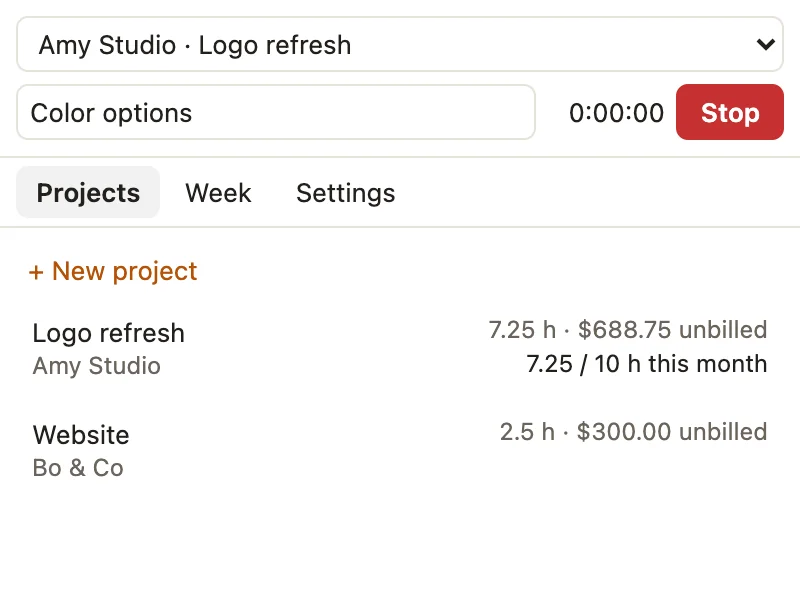
What it does
- Start a timer from SquareA Start timer button sits on each customer in your Square customer directory. Or start one from the panel, for any project.
- Log time by handType "1:30", "1.5" or "90m". Mark time billable or not, and set rates per project or per entry.
- See what's unbilledHours and amounts per project, with optional rounding to 6, 15 or 30 minutes.
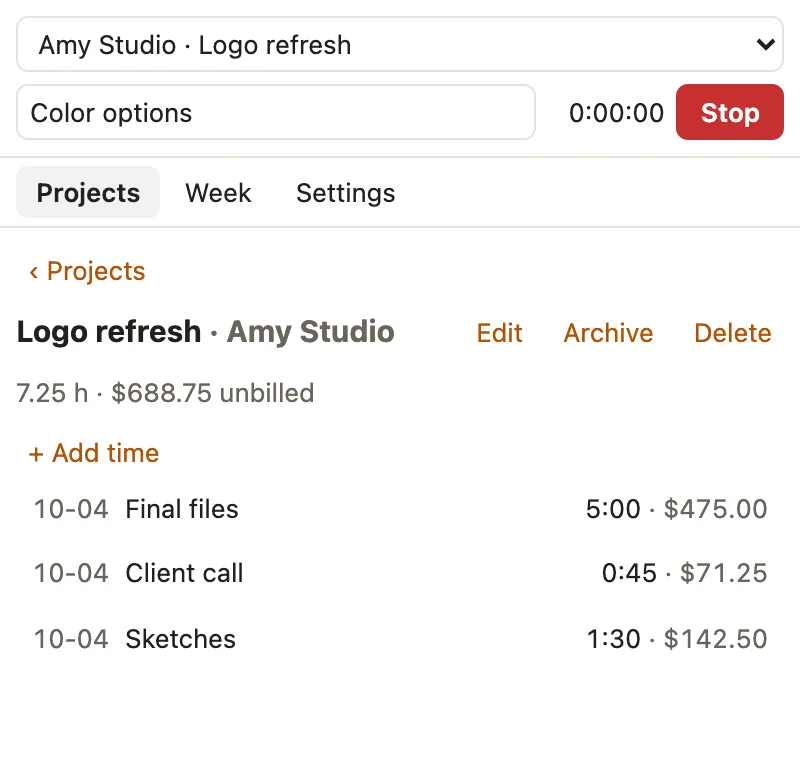
- Partial hours on the invoiceIn Square's invoice editor, pick the unbilled hours and add them as line items in one click (Pro). Square only takes whole quantities, so 1:45 at $90 goes on as one $157.50 line, and the item note your customer sees says "1.75 h at 90.00/h" and the date.
- Catches forgotten timersA timer that ran over four hours is flagged so you can check it before you bill it.
- Your hours stay with youNo account and no server. Export a CSV backup any time, and import old hours from spreadsheets, Toggl or Clockify (Pro).
Price
| Free$0 | Pro$19, paid once | |
|---|---|---|
| Timer, manual entries, rounding | Yes | Yes |
| CSV export | Yes | Yes |
| Open projects | 1 | Unlimited |
| Add unbilled hours to Square invoices | No | Yes |
| Week view | No | Yes |
| Contracted-hours budgets | No | Yes |
| Printable timesheets (save as PDF) | No | Yes |
| CSV import (old hours, spreadsheets) | No | Yes |
No subscription. Upgrade from Settings in the panel. Payment is handled by ExtensionPay and Stripe, and the extension never sees your card.
More: How to bill partial hours on Square invoices.
Questions
- Is this made by Square?
- No. Timecomb is an independent extension by Otter Potter and is not affiliated with, endorsed by, or sponsored by Square or Block, Inc.
- What does it see in my Square account?
- Only the customer's name and company on their page, so Start timer knows who you're timing. In the invoice editor it adds the lines you chose as one-time items, so nothing is added to your item library. It never reads payments, cards, balances, payouts or sales, and never saves or sends an invoice.
- Where are my hours stored?
- Only in your browser on this computer. Nothing is sent to us. Export a CSV backup from Settings now and then; uninstalling the extension deletes your hours. See the privacy policy.
- Does it send invoices for me?
- No. It adds line items to the invoice you're editing. You review it, then save and send it in Square as usual.
- Why one line instead of hours × rate?
- Square's one-time invoice items only take whole-number quantities, so 1.5 becomes 1. Timecomb bills whole hours as quantity × rate, and partial hours as one line at the exact total, with the hours and rate written in the item note. Your customer sees both.
- I use HoneyBook or Dubsado.
- There's a Timecomb for HoneyBook and a Timecomb for Dubsado too. They're separate extensions, each with its own hours and its own Pro.
- I paid on another computer. How do I get Pro here?
- Open Settings in the panel and choose "Already paid? Log in."
- Something else?
- Email dgraciano8424@gmail.com, including questions about a purchase.